Using Ubiquiti Account and Services
This article explains how to use your Ubiquiti account to manage your controller, the services this enables, and how to set things up after migrating to UniFi OS.
Overview
Using your Ubiquiti account to manage your UniFi controller enables:
- Remote Access — manage your controller from anywhere via unifi.ui.com
- MFA (Multi-Factor Authentication) — secure your login with an authenticator app
- Cloud Email — email notifications, password resets, and user invitations
- Push Notifications — alerts via the UniFi mobile app
- Site Manager — manage sites across multiple controllers in one place
The main trade-off is that Ubiquiti's Cloud SSO service needs to be operational for SSO-linked users to log in. Local admin accounts can always log in regardless of cloud availability.
Remote Access
UniFi Network Application (Standalone)
Enable or disable Remote Access from Settings > System > Advanced, then toggle Remote Management.
UniFi OS
Enable or disable Remote Access from OS Settings > Console, then toggle Remote Access. You will be prompted to sign in with your Ubiquiti account.
NOTE: Remote Access is optional. Your local admin accounts work without it. Only enable it if you want to manage your controller remotely via unifi.ui.com.
Add Ubiquiti User Accounts
- Create a Ubiquiti account at account.ui.com
- Invite the user to your controller
NOTE: You can enable MFA (2 Factor Authentication) on your Ubiquiti account at account.ui.com under Security to further secure your login.
Enable Ubiquiti Email Services
UniFi Network Application (Standalone)
Go to Settings > System > Advanced then select SSO Email next to Email Services.
NOTE: Remote Access must be enabled to use Ubiquiti Email Services on the standalone Network Application.
UniFi OS
Go to OS Settings > Console and select UI Mail Server under Email Services.
Ubiquiti Site Manager
You can manage sites from all controllers connected to your Ubiquiti account from unifi.ui.com.
Remote Access must be enabled on each controller you want to manage via Site Manager.
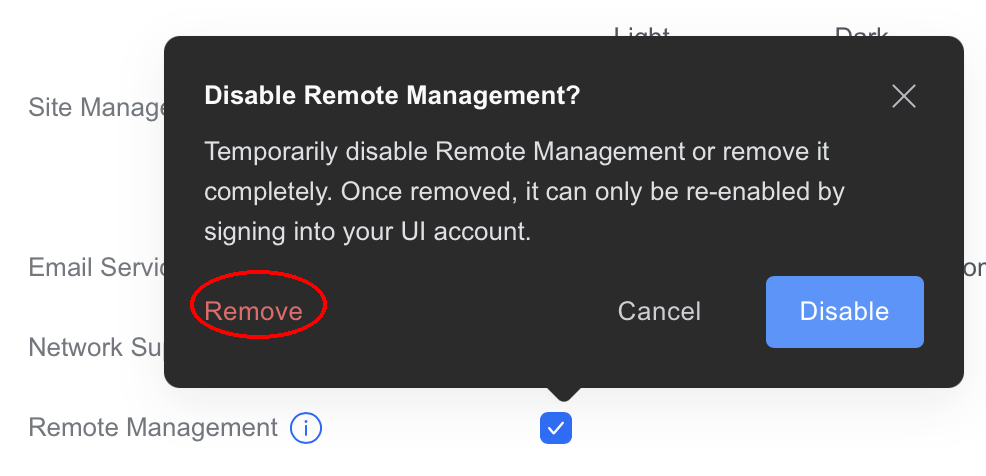
NOTE: If your sites are showing offline on Site Manager, try using the Remove option for Remote Access and then enable the feature again. Make sure to select Remove (not "Disable") as shown below.
After Migrating to UniFi OS
If your controller was recently migrated from the standalone UniFi Network Application to UniFi OS, here is what you need to know:
Remote Access
- If you did not have Remote Management enabled before the migration, your local admin accounts work exactly as before. Remote Access is optional — you can enable it later if you want.
- If you did have Remote Management enabled, you will need to re-enable it on UniFi OS. Go to OS Settings > Console and toggle Remote Access. Sign in with your Ubiquiti account credentials (email or username from account.ui.com), not your local controller admin login.
Captive Portals
Captive portal guest authentication services (such as social login providers) will need to be re-authenticated after migration, as session tokens do not carry over from the backup.
Switching from Local Admins to Ubiquiti SSO Logins
If you have existing local admin accounts and want to switch them to Ubiquiti SSO logins, the process depends on whether the local account's email already matches your Ubiquiti account email.
If the Emails Already Match (Automatic Linking)
If the local admin account uses the same email address as the Ubiquiti account, the accounts will link automatically:
- Enable Remote Management at Settings > System > Advanced
- Enable Sync Local Admin with Ubiquiti SSO at Settings > System > Advanced
- Log in using your Ubiquiti account credentials — the local account will link to your Ubiquiti account automatically
Repeat for other staff members one at a time.
If You See "This Email Is Already in Use"
If you see a "This email is already in use" error when trying to link accounts, follow these steps instead:
NOTE: Before starting, make sure Remote Management and Sync Local Admin with Ubiquiti SSO are both enabled at Settings > System > Advanced.
- Create a temporary local admin account (if you don't already have a second admin)
- UniFi OS only: Transfer the Owner role to the temporary admin at OS Settings > Admins
- Verify the temporary admin can log in
- Delete the original local admin account (this frees the email)
- Invite the Ubiquiti account using that email address
- UniFi OS only: Transfer the Owner role back to the new SSO account
Repeat for other staff members one at a time.
IMPORTANT: Always verify the temporary admin can log in before deleting any accounts. This prevents getting locked out of your controller.
Troubleshooting
"Something in your network is blocking ports"
This error appears when enabling Remote Access on UniFi OS. The most common cause is entering the wrong credentials:
- The Remote Access dialog requires your Ubiquiti account credentials from account.ui.com
- Do not enter your local controller admin username and password
- Your Ubiquiti username may be different from your local admin username (e.g.,
richard.scott1vsRichardScott)
If you are sure you are using the correct Ubiquiti credentials and still see this error, contact support.
"You do not have permission to access this device"
This means your Ubiquiti account is not registered as an admin on this controller. This is expected after migration — only local accounts are carried over.
To fix this:
- Log in with your local admin credentials first
- Enable Remote Access using your Ubiquiti account (see above)
- Your Ubiquiti account will then have access to the controller
"This email is already in use" when inviting
If a local admin account already uses the same email as the Ubiquiti account you want to invite, see the Switching from Local Admins to Ubiquiti SSO Logins section above for the step-by-step process.
Don't have a Ubiquiti account?
Create one for free at account.ui.com. This is separate from your local controller admin account.