

Your UniFi OS Server Console: An Overview
A hosted UniFi OS Server is Ubiquiti's UniFi OS running on a private server that we look after. This page explains what is in it, which addresses to use, which settings to leave alone, and where Ubiquiti's own documentation applies.
What is running
- UniFi OS Server is the console layer: sign-in, users, updates, backups and Remote Access.
- Network is the application you manage your sites and devices in. It opens automatically when you sign in.
- Identity is available alongside Network for user and access management.
- InnerSpace (WiFi planning) can be installed from Settings > Control Plane > Updates.
- Protect, Talk and Access need Ubiquiti hardware and do not run on a hosted console.
Your addresses
The console uses standard HTTPS on port 443, so there is no port number to type. UniFi OS Server itself listens on port 11443; our proxy handles that for you.
If your console was migrated from the Network Application, your old .cloudunifi.com address keeps working alongside the new one, and devices can inform to either. You can also use your own domain: see Using your own domain.
Settings to leave alone
Open Settings (the gear at the bottom of the left-hand bar), then Control Plane > Console.
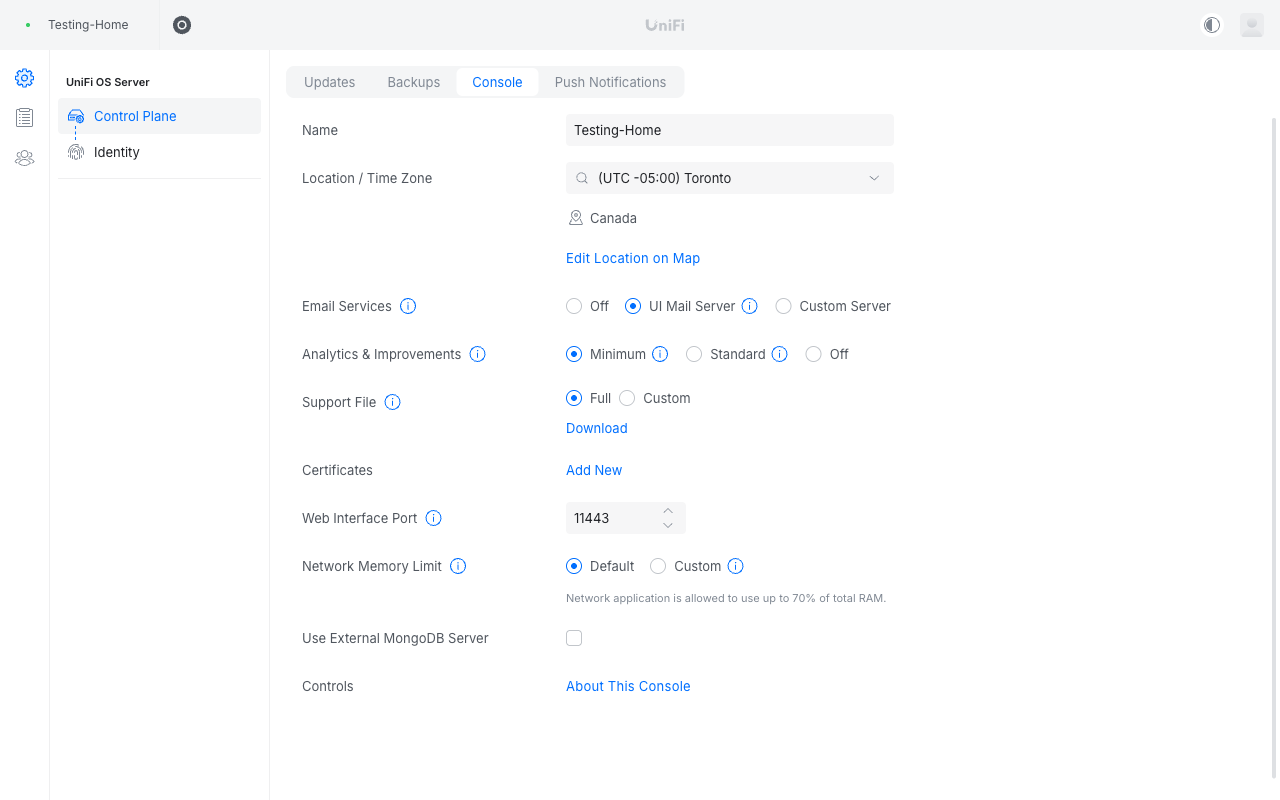
Three settings that will break access if changed
- Web Interface Port: leave it at 11443. Our proxy expects this port; changing it locks you out of the console.
- Certificates: leave empty. We issue and renew the certificate for your address and any custom domain. Adding your own here is not needed and can break HTTPS.
- Use External MongoDB Server: leave unticked.
Everything else on that page is yours to change: the console Name, Location / Time Zone, Email Services (the UI Mail Server sends invitations and alerts by default), Analytics & Improvements, Remote Access and push notifications.
Support files
If Ubiquiti Support ask for a support file, it is on the same page: Support File > Download.
The Submit Support Ticket link at the bottom of the Network settings goes to Ubiquiti, not to us. For anything about hosting, backups, addresses or access, contact us by email or through the customer portal chat.
What Ubiquiti controls
You accepted Ubiquiti's terms for UniFi OS Server when the console was set up. Under those terms Ubiquiti decides when updates ship and whether cloud features such as Remote Access, unifi.ui.com and the mobile app are available, and can change them without notice. Your console address keeps working whatever happens to the cloud features.
Ubiquiti's own documentation
For how the software itself works, Ubiquiti's articles are the best source. The ones that apply to a hosted console:
- Self-Hosting UniFi
- Choosing the Right UniFi Control Plane
- UniFi Updates
- Backups and Migration in UniFi
- UniFi Remote Management via Site Manager
- Adding Admins in UniFi and UniFi Roles Explained
- UniFi Password Recovery and Ownership Transfer
- Required Ports Reference
- Getting Support Files and Logs
Next